Zooz ZSE11 800LR 800 Series Z-Wave Long Range Q Sensor | Motion, Temp, Humidity, Light
Zooz ZSE11 800LR 800 Series Z-Wave Long Range Q Sensor | Motion, Temp, Humidity, Light
SKU:BRNZSE11 800LR
NOTE: Z-Wave gateway controller required - sold separately. You need a security-enabled controller to take full advantage of the product.
This product is available in different Z-Wave frequencies so please make sure you choose the correct region before checking out. You need to select the same frequency/region as your end devices when buying Z-Wave controllers to include products to your system without issues. If you're not sure which frequency your devices use, please contact the manufacturers first. Here is what each option stands for:
- US/CA/MX: 908.42 MHz (used primarily in US, Canada, and Mexico, the default option for all products)
- EU/UK: 868.42 MHz (used primarily in Europe), Z-Wave Long Range is not supported for this frequency!
PRODUCT HIGHLIGHTS
- Beta release: you may need to update the firmware in the near future to get full functionality of your device; the device may not be fully compatible with your hub at the time of this release.
- Security monitoring: get motion alerts sent to your Z-Wave hub whenever activity is detected
-
Climate control: use this sensor to trigger your smart thermostat or humidifier based on regular precise temperature and humidity readings
-
Smart lighting: program your Z-Wave switches and smart bulbs to come on when the Q sensor reports motion and luxlevels below your preferred set point
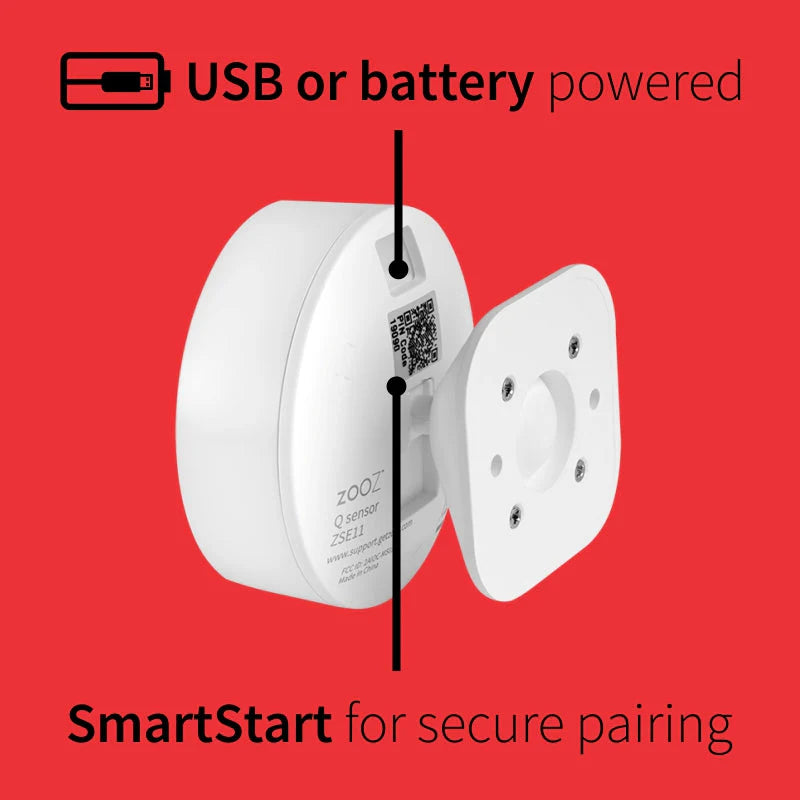
- Power it with 2 CR 123A batteries (included) or a micro USB cable (sold separately, scroll down to shop)
- Works as Z-Wave signal extender when powered via USB (do NOT pair the sensor on USB cable and then switch to batteries)
- NEW 800 series Z-Wave chip: more range for reliable wireless communication
- Z-Wave Long Range ready: extend the wireless coverage up to 1300 feet if your hub supports Long Range
- SmartStart and S2 authenticated security
- Advanced settings to customize your sensor
- CHECK HUB COMPATIBILITY BEFORE BUYING (DOESN'T WORK WITH WINK OR ALARM PANELS)
- Modern minimal design with a multi-directional mini mounting bracket
- Register your product for 5-year warranty and lifetime tech support
Specifications
Specifications
WORKS WITH
Z-Box Hub (recommended for Zooz products)
Fibaro Home Center 2
Fibaro Home Center Lite
Home Assistant (Z-Wave JS)
HomeSeer
Homey (Zooz App for Homey)
Hubitat
Indigo
openHAB
SmartThings Hub (register your product here to access the custom lua driver for advanced functionality)
NOTE: If you don't see your Z-Wave controller on the list above, please contact us before you purchase this product.
SPECIFICATIONS
Z-Wave Region: US / CA / MX
Z-Wave Chip: 800 series
Power: 2 CR123A battery (included) / micro USB (cabled not included)
Z-Wave Range: Up to 150 feet line of sight (or up to 1300 feet with Long Range enabled)
Motion Detection: Up to 20 feet
Humidity Detection Range: 0 – 100 %
Light Sensor Detection Range: 0 – 65535 lux
Operating Temperature: 32° – 104° F
Dimensions: 2.3” x 2.3” x 2.2”
Installation: Indoor Use Only
Installation Details
Installation Details
Power Options:
The sensor can be powered by 2 CR123A batteries (included) or via a micro USB cable (sold separately).
The 800 series allows you to use both battery and USB power simultaneously, unlike previous modelsthesmartesthouse.com+1.
Inclusion (Pairing) with Your Z-Wave Hub
Place the sensor within range of your Z-Wave hub.
Put your hub into inclusion mode (refer to your hub’s manual for instructions).
Press the Z-Wave button on the sensor three times quickly. The LED will flash to indicate successful inclusiongetzooz.com+2.
Mounting and Placement
The sensor can be placed on a flat surface or mounted on a wall using the included mounting bracket.
For optimal motion detection, mount the sensor 7–10 feet high and avoid placing it near vents, windows, or direct sunlight, which can affect temperature and humidity.
Additional Features:
The sensor supports SmartStart for easier setup if your hub is compatible.
It can act as a Z-Wave signal extender when powered via USB, improving network rangethesmartesthouse.com+1.
Troubleshooting
If the sensor doesn’t pair, ensure it’s within range and your hub is in inclusion mode. Try resetting the sensor by holding the Z-Wave button for 20 seconds.
For more detailed instructions, please refer to the full user manual.
Pelagic Power Tip
Pelagic Power Tip
This device allows for both battery and USB powering simultaneously (unlike older models). This is useful for critical applications where you want backup power if the USB source fails.
Low stock: 6 left
Couldn't load pickup availability