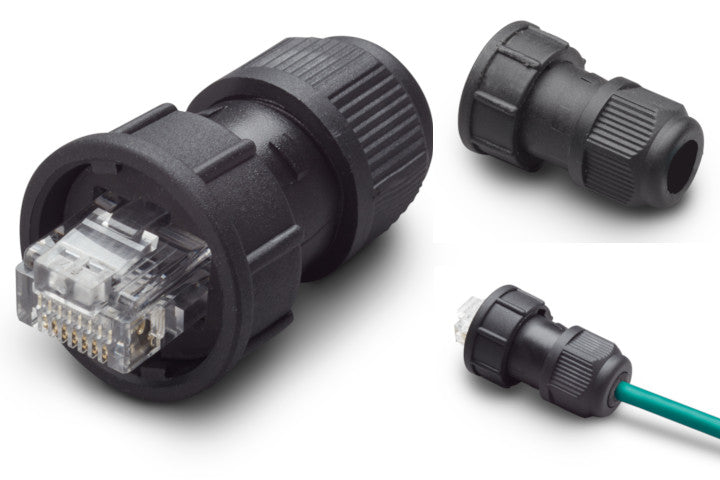
Mastervolt 6369230060 Li-Ion waterproof field installable plug
Mastervolt 6369230060 Li-Ion waterproof field installable plug
SKU:MVT6369230060
- IP65 Waterproof Rating: Prevents water, moisture, and dust ingress in harsh marine or mobile environments.
- Field Installable: Designed for on-site installation directly onto a data cable using an RJ45 crimping tool.
- System Integrity: Protects critical network links (like MasterBus) to prevent corrosion and electrical failure.
- Compatibility: Perfectly matches Mastervolt MLI Ultra battery series (such as the 12/3000 or 24/5000 models).
Specifications
Specifications
Technical SpecificationsProduct Code: 6369230060Ingress Protection (IP) Rating: IP65 (Fully dust-tight and protected against low-pressure water jets)Connection Type: RJ45 (Compatible with Mastervolt MasterBus / CZone network standards)Compatibility: All Mastervolt MLI Ultra Lithium-Ion batteries (12V and 24V series)Primary Material: High-grade, corrosion-resistant marine polymer
Installation Details
Installation Details
Step-by-Step Installation GuideYou do not need specialized factory service to install this plug, but you will need a standard RJ45 crimping tool and an adjustable wrench.Disassemble the Plug: Unscrew the compression nut from the back of the waterproof housing and remove the internal rubber split-gland (grommet).Feed the Cable: Thread the raw, uncut MasterBus data cable through the compression nut first, followed by the waterproof housing.Crimp the RJ45: Strip the outer jacket of the cable, line up your wires to standard RJ45 networking pinouts, and crimp the included RJ45 male connector onto the wires using your crimping tool.Seat the Connector: Pull the cable back slightly until the crimped RJ45 connector seats snugly inside the front of the waterproof housing.Insert the Gland: Push the rubber sealing grommet down the cable and slide it into the rear of the housing to form a tight seal around the data wire.Tighten and Lock: Hand-tighten the compression nut onto the rear of the housing, then use a wrench to give it a final quarter-turn to lock the weatherproofing seal in place.
Pelagic Power Tip
Pelagic Power Tip
Expert Tech Tip: Avoid the "Capillary Wick" FailureWhen installing MasterBus networks in harsh spaces like bilges or marine engine rooms, temperature fluctuations create an internal vacuum inside data cables. If a cable jacket gets nicked further down the line, moisture can actually be sucked through the inside of the wire insulation directly past your waterproof plug.The Fix: Before tightening down the final compression nut during Step 6, apply a small dab of dielectric grease (silicone grease) directly inside the rubber sealing grommet where it meets the cable jacket. This adds a secondary hydrostatic barrier that guarantees water cannot bypass the seal under high-humidity or high-vibration conditions.
12 in stock
Couldn't load pickup availability