CZone Motor OI Interface C/W Con Boot 80-911-0007-00
CZone Motor OI Interface C/W Con Boot 80-911-0007-00
SKU:CZN80911000700
Specifications
Specifications
• Part Number: 80-911-0007-00 (Kit with Connector and Boot)
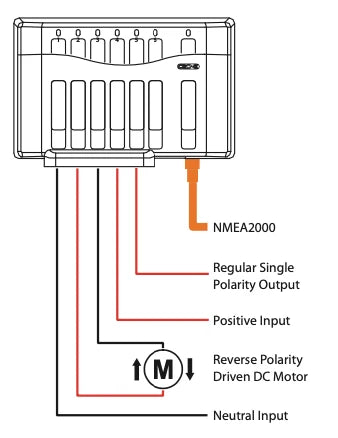
• Output Configuration: 1 x Motor control pair (for reversing polarity) and 2 x Standard normal output channels
• Current Rating: 20 A maximum per channel
• Network Connectivity: NMEA 2000 (Micro-C connector)
• Ingress Protection: IPX5 water-resistance (when mounted vertically with the boot installed)
• Dimensions: 128 mm x 200 mm x 45 mm (5.0" x 7.9" x 1.8")
• Voltage Compatibility: 12 V and 24 V DC systems
• Protection Features: Software-managed overcurrent protection, built-in intelligent circuit protection, and electronic fuses
Installation Details
Installation Details
Mounting and Placement
• Mount the module vertically on a flat, solid surface. Ensure the cables exit downward so that water cannot pool near the seal.
• Choose a dry or sheltered location. While IPX5 rated, the unit should not be submerged or subject to high-pressure washdowns.
• Leave at least 50 mm (2 inches) of clearance around the unit for proper airflow, heat dissipation, and cable routing.
2. Network Connection
• Connect the module to the NMEA 2000 network backbone using a standard CZone drop cable.
• Ensure the network is powered and properly terminated on both ends.
3. Power and Load Wiring
• Main DC Power: Connect the main positive (+) DC supply from your distribution panel or battery switch to the main power studs using appropriately sized marine-grade cable and lugs. Tighten to specified torque values.
• Grounding: Connect the negative (-) ground wire to the system's common negative bus.
• Output Wiring: Insert your motor control wires and standard load wires into the provided mating connector pack.
• Pins for the reversing motor output must be wired directly to the positive and negative terminals of the DC motor.
• Pins for the standard outputs should connect to your traditional DC loads.
4. Weatherproofing the Connections
• Pull the wires through the provided rubber boot before making the final terminal connections.
• Push the connector firmly into the module until it clicks into place.
• Slide the rubber boot up and securely over the base of the module and the wiring bundle to ensure an airtight, water-resistant seal against moisture and dust.
5. Configuration and Setup
• Set the physical dipswitch on the module to match the unique network address assigned within your CZone configuration file.
• Use the CZone Configuration Tool software via your network interface to assign functions, current limits, and logic settings for the motor and standard output channels.
Pelagic Power Tip
Pelagic Power Tip
Low stock: 1 left
Couldn't load pickup availability