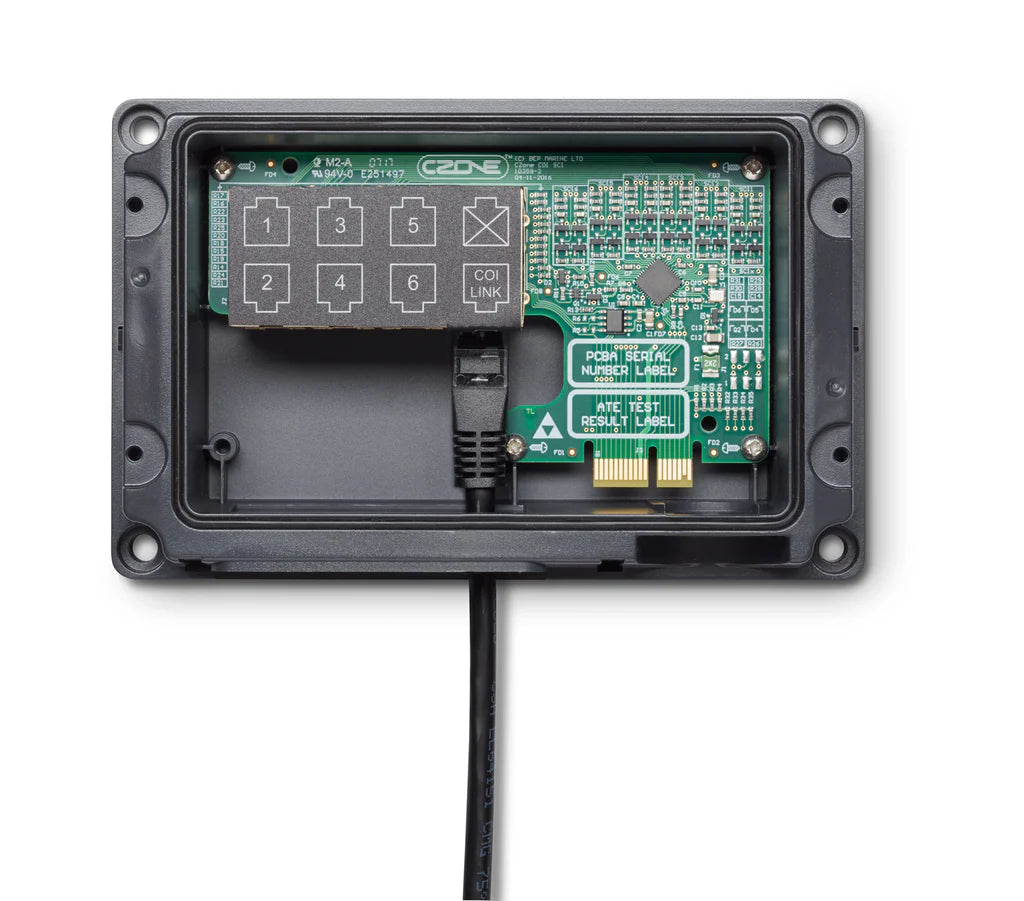
CZone 80-911-0134-00 COI Digital Switch Breakout (DSB) 6-Way
CZone 80-911-0134-00 COI Digital Switch Breakout (DSB) 6-Way
SKU:CZN80-911-0134-00
Product Overview
- Connect up to 6 digital switches to your COI
- Support for single or double throw switches with up to 12 programmable switch points
- Includes dimmable backlighting, systems on and fault code support
- Uses existing SCI switch cables with options for Rocker or Push button plugs at various lengths
- IPX5 water ingress rating for durability and reliability in marine environments
- Auto-Configuration: Most new CZone modules will automatically read the system configuration from the network once plugged in, provided the DIP switches on the module are set correctly to match the intended ID.
- Manual Programming: For custom button assignments, use the CZone Configuration Tool via a USB-to-CAN interface or the USB port on the COI to write the updated configuration to the network
Specifications
Specifications
Dimensions 115 x 153 x 225mm
Weight 0.48
IP Rating IPX5
Number of Switches 6
Switch Type Single or double throw
Programmable Switch Points Up to 12
Backlighting Dimmable LED
Systems On Indicator Yes
Fault Code Support Yes
Installation Details
Installation Details
Mounting Switches: Install your chosen push-button or rocker switches in the desired location on the dash or control panel.
Mounting the DSB: Mount the Breakout interface module as close to the switches as possible to minimize local wiring runs.
Harness Connection: Use standard SCI switch cables to connect the physical switches to the DSB. These cables are available in various lengths and come with plugs specific to rocker or push-button types.
Main Connection: Run the supplied 2-meter lead (or optional 5-meter version) from the DSB module to the dedicated digital switch input on the COI.
Protection: If the digital switch input on the COI is not used, ensure the blanking cap is fitted to maintain the system's IPX5 water ingress rating.
Pelagic Power Tip
Pelagic Power Tip
Prevent "Phantom" Alarms: In the CZone Configuration Tool, ensure you check the "Switched module network power" box. This prevents the system from triggering nuisance alarms when your main display (like a Furuno TZTouch) is off while the rest of the CZone network is still powered.
DIP Switch Matching: Before mounting the DSB, note the physical DIP switch positions on the back of the module. You must manually enter this exact binary code into your Multi-Function Display (MFD) settings to link the physical buttons to the digital on-screen controls.
The "10-Second" Reset: If your switches aren't responding or the status LEDs are behaving strangely, perform a full system hard-reboot.
Turn off the network and screen breakers.
Wait at least 10 seconds to fully depower the modules.
Power back on and select a "Mode" on your screen to re-initialize the network.
USB Config Backup: Always use a formatted USB drive to "Read Config from Network" via the COI’s USB button (hold for 5 seconds until it flashes red) before making any software changes. This creates a czone.back file that acts as your safety net if a new configuration fails.
Waterproof Integrity: If you aren't using all six switch slots on the breakout, keep the blanking caps on the unused ports. This is critical for maintaining the IPX5 rating, especially in exposed center console or flybridge installations.
Out of stock
Couldn't load pickup availability