CZone 80-911-0011-00 Switch Control Interface
CZone 80-911-0011-00 Switch Control Interface
SKU:CZN80-911-0011-00
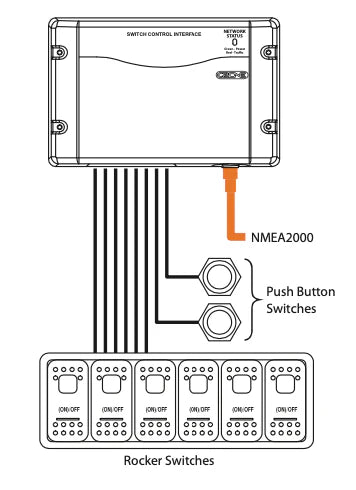
The Switch Control Interface provides an interface between the CZone network and the traditional mechanical switches with which manufacturers and users are familiar. The Switch Control Interface simplifies your wiring, supports your existing choice of switches, protects against failures and allows for more installation options.
- Single switch position can control multiple Output Interface channels.
- Attaches to switch panels via custom Switch Control Interface cable.
- Multiple Switch Control Interface switches can control single Output Interface channel.
- Output for backlighting of switch labels (dimmable).
- Outputs systems on and function/fault codes to systems on LED of switches (dimmable).
- Programmable switch types.
- 8 inputs per module (16 individual controls).
- Sequential button press functionality.
Specifications
Specifications
General specifications
Protection degree IPX5 water ingress
Dimensions, hxwxd 100 x 156 x 42 mm
3.9 x 6.1 x 1.7 inch
Installation Details
Installation Details
Pre-Installation Requirements
Programming: The unit must be programmed before installation using the CZone Configuration Tool and a dedicated USB-to-CAN adapter.
Environment: The module features IPX5 water ingress protection but should be mounted in a protected area to ensure longevity.
Orientation: Like similar CZone modules, it should ideally be mounted vertically with cables exiting downwards to prevent water tracking into the unit.
Installation Steps
Mounting:
Secure the module to a flat, solid surface using appropriate self-tapping screws or bolts.
Ensure all seals and blanking plugs are correctly fitted in unused positions to maintain the IPX5 rating.
Connections:
NMEA 2000: Connect a drop cable from the SCI's CAN port to your NMEA 2000 backbone. The unit receives its power from this network.
Switch Panel: Use a custom SCI cable to attach the module to your physical switch panel. Each module supports 8 inputs (capable of 16 individual controls via sequential presses or dual-position switches).
Grounding: Connect the DC Negative reference to the designated input (typically Input 8 on related CZone signal modules) if required by your specific configuration.
Initial Power Up:
Turn on the NMEA 2000 network power.
Check the Network Status LED; it should light up or flash green to indicate communication with the network.
Verify switch functionality via the CZone display or configuration software to ensure the signals are correctly controlling the intended output channels
Pelagic Power Tip
Pelagic Power Tip
The "Two-Step" Driver Fix
If you are using the CZone Configuration Tool and it fails to recognize your SCI module despite everything being plugged in, it is often a driver handshake issue.
To force a clean reconnect:
Clear the "Pegasus" Flag: Navigate to Documents > CZone > User Data on your PC and delete the file named PegasusInstalled.txt.
Reset & Restart: Restart the Configuration Tool. This forces the software to reinstall the USB-to-CAN drivers from scratch during the startup sequence, typically resolving any "missing module" errors immediately.
Bonus Maintenance Tip: Visual Diagnostics
Always check the Circuit Status LEDs on the module. They aren't just "on/off" indicators; they provide specific flash codes for troubleshooting:
Solid Green: Valid signal input (all good).
3x Red Flashes: There is a Dip Switch Conflict (two modules have the same address).
5x Red Flashes: No other modules are detected on the network—check your NMEA 2000 terminators and power.
device.report
Low stock: 3 left
Couldn't load pickup availability